There comes a moment in every family when a child starts asking for more independence. Maybe they want to walk to school with friends, stay a little longer at the park, or ride their bike to a neighbor’s house. For parents, that moment brings a mix of pride and worry. You want your child to grow, but you also want to know they are safe and reachable.
For many families, a smartphone feels like too much, too soon. Open access to apps, social media, and the internet raises concerns that most parents of young children are not ready to handle. That is where a kids GPS watch comes in. It sits in the middle ground between no device at all and a full smartphone, giving children a way to call home while letting parents see where they are.
This article looks at whether a GPS watch actually fits your child’s stage of life, which features deserve your attention, how connectivity works behind the scenes, and how to set one up so it supports trust rather than replacing it. By the end, you should have a clear sense of whether this kind of device is the right first step for your family.
Why Parents Are Choosing Watches Over Phones
The appeal of a watch starts with what it leaves out. A smartphone is a gateway to endless content, group chats, and games designed to hold attention. A watch built for children strips that away and focuses on a few essentials: calling approved contacts, sharing location, and sending quick alerts when something feels wrong.
Parents of children between roughly six and twelve often describe the same situation. Their child is old enough to be away from an adult for short stretches, but not old enough to manage the distractions and risks of a phone. A kids gps watch fills that gap. It stays on the wrist, so it is harder to lose than a phone left on a bench, and it is less tempting for other kids to borrow or grab.
There is also a practical benefit for schools and activities. Many classrooms restrict phones, but a watch with a quiet or class mode can stay on without becoming a distraction. Coaches, camp counselors, and grandparents usually find a watch less intrusive, too. For a child, wearing one can feel like a small badge of responsibility rather than a leash.
Features That Actually Matter Day to Day
Product pages tend to list dozens of features, but only a handful shape your everyday experience. Focusing on these makes comparison far easier and helps you avoid paying attention to extras that your child will never use.
Location Tracking You Can Rely On
Real-time location is the headline feature, and its quality varies. Look for watches that combine satellite positioning with other signals, such as nearby Wi-Fi networks and cellular towers. That mix helps when a child is indoors at a library or shopping center, where satellite signals alone can drift. Geofencing is equally useful. It lets you draw virtual boundaries around places like school or home, then receive a notification when your child arrives or leaves. Instead of checking the map constantly, you simply get told when something changes.
Calling, Contacts, and Emergency Alerts
Two-way calling should be simple enough for a young child to use without help. The most important safeguard here is a contact whitelist, which means only numbers you approve can call the watch or be called from it. That blocks spam calls and unknown numbers entirely. An SOS button is the other must-have. With a long press, the watch should alert several trusted adults at once and share the current location. Walk your child through it so they know it exists, and so they understand it is for real emergencies.
School Mode and Comfort
A school mode silences calls and games during set hours while keeping emergency functions active. It shows teachers that the device respects the classroom. Comfort matters just as much. A watch that feels bulky or itchy will end up in a backpack, which defeats the purpose. Let your child try the strap and weight if possible, and choose a design they actually like wearing.
How Connectivity Keeps the Watch Working
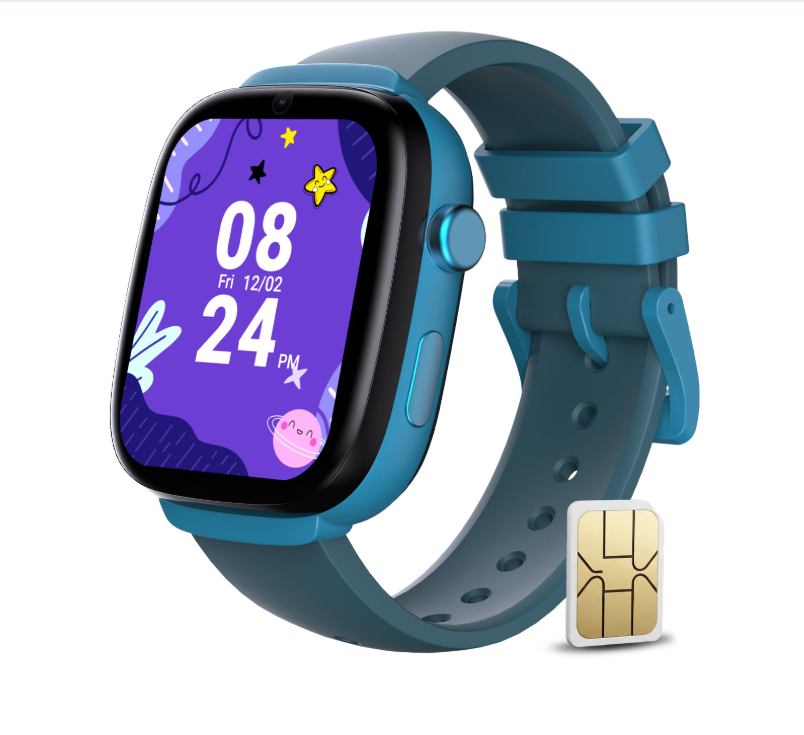
Here is the part many parents overlook until setup day: a GPS watch needs a mobile connection to do most of its job. Satellite positioning tells the watch where it is, but sending that location to your phone, making calls, and delivering alerts all rely on a cellular network. That means the watch needs a SIM card and a compatible data plan.
Before buying, check which networks the watch supports and whether a plan is bundled or sold separately. Some families prefer a watch paired with a dedicated plan from a provider that focuses on connected devices, since those plans are usually designed around low data use. Brands such as Eiotclub pair their watches with SIM options built for this kind of device, which can remove a lot of guesswork during activation.
Coverage deserves a quick check as well. Think about where your child actually spends time: school, after-school programs, a relative’s house, the route in between. If coverage is weak in one of those places, location updates and calls may lag. Asking neighbors which carrier works best locally is an easy and surprisingly reliable test.
Setting Up the Watch Step by Step
A thoughtful setup takes about an hour and pays off for months. Rushing it often leads to confusion later, such as a grandparent who cannot get through or alerts that fire at the wrong times. Working through the steps below in order keeps things tidy.
- Insert and activate the SIM card, then confirm the watch shows a network signal.
- Download the companion app on your phone and pair it with the watch.
- Add every approved contact to the whitelist, including a second parent, grandparents, and a trusted neighbor.
- Set up geofences around home, school, and any regular activity locations.
- Schedule school mode and a nighttime quiet period.
- Test a call, a location refresh, and the SOS button together with your child.
After setup, spend the first week paying attention to how the watch behaves. Check whether location updates arrive at a sensible pace and whether battery life lasts through a full school day. Small adjustments, like reducing how often location refreshes, can make a big difference in battery performance without sacrificing safety.
Building Trust Instead of Just Tracking
A GPS watch works best when your child understands why they are wearing it. If it feels like surveillance, children may resent it or find ways to leave it behind. If it feels like a tool that gives them more freedom, they are far more likely to embrace it.
Start with an honest conversation. Explain that the watch lets you say yes to things you might otherwise hesitate over, like walking to a friend’s house. Agree together on when you will check their location and when you will not. Some families choose to only look at the map when a child is late or has not checked in, which respects the child’s growing sense of privacy.
It also helps to set shared expectations. Your child might agree to answer calls from parents within a few minutes, while you agree not to call repeatedly during playtime. Revisit these rules every few months. As your child shows responsibility, you can loosen restrictions, add new places to their safe zones, and eventually talk about what the next device might look like.
Finally, remember that no gadget replaces practical safety skills. Teach your child your phone number by heart, show them which adults to approach if they are lost, and practice what to do if the watch battery dies. The watch is a helpful layer, not the whole plan.
Giving Your Child Freedom With a Safety Net
Deciding on a first device is less about technology and more about your child’s readiness and your family’s needs. For many children in the early school years, a GPS watch offers exactly the right balance. It keeps communication simple, gives parents peace of mind through location sharing and emergency alerts, and avoids the distractions that come with a full smartphone.
The key is choosing with care. Focus on dependable location tracking, a locked-down contact list, a working SOS function, and a school mode that respects the classroom. Confirm that the watch has a compatible SIM and reliable coverage in the places your child goes most. Then take the time to set it up properly and talk openly about how it will be used.
Handled this way, the watch becomes more than a tracker. It turns into a stepping stone that helps your child build independence one small outing at a time, while you stay just a tap away.