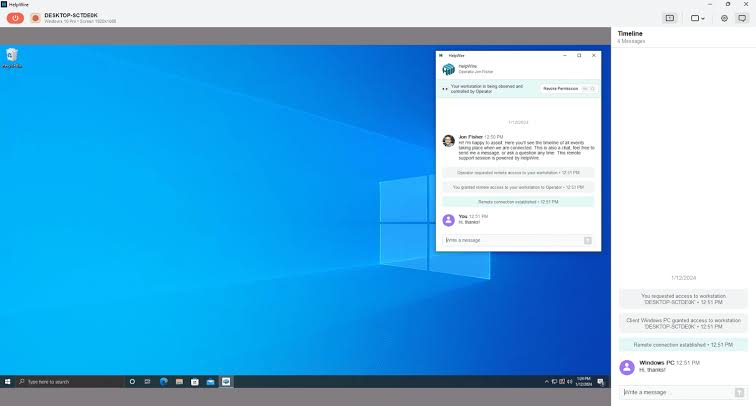
Selecting remote PC software is a decision that can affect productivity, security, and IT operations long after the initial purchase. The wrong choice can create friction for users, additional work for IT teams, and security gaps that require time and resources to correct. A well-planned evaluation, on the other hand, can identify a solution that grows with the organization and delivers consistent performance across the different use cases the team needs to support.
This guide covers the key features and criteria buyers should consider before committing to a remote PC software solution, with particular attention to security, compatibility, performance, administration, and long-term value.
Understanding What You Actually Need
The evaluation process should begin before vendor research starts. Organizations that clearly understand what they expect from remote PC software are better positioned to compare solutions objectively than those approaching the market with only a general need for “remote access.”
Start by identifying the main use cases. Is the software primarily intended for IT help desk teams that need to troubleshoot employee devices? Will employees use it to access office workstations while working remotely? Does the IT department need unattended access to servers or devices outside regular business hours? Or does the organization need to support all of these scenarios? Each use case introduces different requirements for session latency, file transfers, mobile access, administration, and security.
It is equally important to define the device environment. The platforms used throughout the organization, Windows, macOS, Linux, iOS, Android, Chrome OS, determine which solutions are practical from the beginning. A product that performs well on Windows but provides a weaker experience on macOS or mobile devices can create an inconsistent environment that generates the same support challenges remote access software is intended to reduce.
Cross-Platform and Device Compatibility
The workforce device landscape has become much more varied over the past decade. Employees may work from company-issued laptops, approved personal devices, tablets used in the field, or smartphones when they need quick access while traveling. Remote PC software should support this range without forcing users to change devices or compromise their normal workflows.
Compatibility testing should cover both sides of the connection: the host machines being accessed and the client devices used to connect to them. A solution that delivers full functionality for Windows-to-Windows sessions but provides fewer capabilities when connecting from macOS to Windows, or from an iOS device to another platform, may not be suitable for a diverse workforce.
For remote PC software with strong security, cross-platform functionality should not come at the expense of the controls and policies required by the IT team. Features such as session recording, access restrictions, and audit logging should remain consistent regardless of the platform employees use to establish the connection.
Security as a Non-Negotiable Foundation
Security is one of the most important dimensions of any remote PC software evaluation. Deploying a remote access tool across an organization creates a connection path from external networks to internal systems, which means that path needs appropriate safeguards at every stage.
A strong baseline should include encryption for session data, multi-factor authentication for user accounts, and role-based access controls that determine which devices and systems individual users are permitted to reach. Detailed session logging is also important, both for security monitoring and for organizations that need reliable records during compliance reviews.
Encryption standards deserve closer examination. Session information traveling between the client and host should be protected with current industry-standard protocols, and buyers should ask vendors specific questions about their encryption implementation instead of relying solely on broad marketing statements. Security architecture should account for protecting information while it is being transmitted and while relevant data is stored.
Organizations evaluating solutions that may handle regulated information, including healthcare records, financial data, or government systems, should also review the vendor’s applicable third-party security certifications. Depending on the environment, these may include SOC 2 Type II documentation, HIPAA-related controls, or FedRAMP authorization where relevant. Independent assessments can provide greater assurance than relying entirely on self-reported security claims.
Authentication deserves particular attention as well. Identity and access management practices have developed significantly, providing organizations with established approaches for evaluating secure login and authorization controls. Resources such as the digital identity access standards maintained by NIST offer useful guidance for understanding what buyers should expect from identity verification and access management systems when assessing a remote access platform.
Evaluating Performance Under Real Conditions
Remote PC software that performs smoothly during a controlled demonstration may behave differently once deployed across a workforce using varied network connections. Performance testing should therefore extend beyond ideal conditions presented during a product demo.
Important factors to examine include latency under different bandwidth conditions, frame rate consistency when handling visually demanding work, stability during extended sessions, and responsiveness when users connect through mobile networks rather than high-speed broadband.
Employees working with resource-intensive applications, such as design software, video editing platforms, data visualization tools, or CAD programs, have very different performance needs from users performing routine office tasks. Testing representative workloads rather than simple desktop navigation provides a clearer picture of how a solution will behave in day-to-day use.
Bandwidth optimization should also be considered. Solutions that use adaptive quality controls and effective compression may perform better for remote employees working on constrained connections than products designed around consistently fast networks. These differences often become apparent only when testing under conditions that resemble the organization’s actual working environment.
Deployment Model and IT Administration
Remote PC software varies considerably in how it is deployed and how much ongoing administrative effort it requires. Cloud-hosted solutions managed by the vendor can reduce the infrastructure burden on internal IT teams, but they also require confidence in the vendor’s availability and data handling practices. On-premises deployments offer greater direct control but require additional infrastructure and internal expertise. Hybrid approaches can provide a middle ground, although they may introduce their own management complexity.
IT administrators also need effective tools for monitoring active sessions and connected devices. Centralized dashboards that show connection status, user activity, and device information can make it easier to manage larger remote access environments. Administrators should be able to revoke access, modify permissions, and apply policy changes without having to manage every endpoint individually.
Integration with existing IT systems is another significant consideration. Solutions that can authenticate through the organization’s established identity environment using technologies such as SAML, SSO, or Active Directory can reduce the burden of maintaining a separate user directory. This can also make access changes more consistent when employees join, change roles, or leave the organization.
Licensing Structure and Total Cost
Licensing models for remote PC software vary widely and can have a major effect on total cost depending on how the organization uses the platform. Per-user licensing, per-device licensing, concurrent-session models, and enterprise agreements all suit different operating environments. Understanding the licensing structure before signing an agreement can help prevent unexpected costs as usage grows or working patterns change.
Buyers should look beyond the base license price and determine exactly which features are included. Capabilities that appear standard during a demonstration, such as session recording, multi-monitor support, file transfer, mobile access, or ticketing integrations, may be restricted to premium plans or require additional purchases. Requesting a detailed feature comparison tied to specific pricing tiers can reveal the actual cost of the configuration the organization intends to deploy.
Data security within cloud-delivered services can also influence total cost. Organizations with strict data residency requirements or compliance obligations may need specific deployment options that affect which licensing tier is appropriate. Microsoft’s published guidance on enterprise data encryption guidance demonstrates the level of planning enterprise environments may require when protecting information across cloud and on-premises systems, providing a useful perspective when assessing whether a vendor’s approach meets organizational requirements.
Vendor Support and Long-Term Reliability
Vendor support can be easy to overlook during the buying process but difficult to compensate for once the software becomes part of daily operations. If remote access infrastructure becomes unavailable, distributed employees and IT teams may be affected immediately. The speed and quality of vendor support can therefore have a meaningful operational impact.
Before committing to a solution, compare the vendor’s support options with the organization’s actual needs. Review service level agreements covering uptime and response expectations. Consider whether technical support is available during the hours the organization operates, particularly when employees work across multiple time zones. Independent feedback from organizations with a similar size and technical environment can also provide useful context about real-world support experiences.
Long-term vendor stability matters as well. Remote PC software can become an important part of an organization’s infrastructure and may not be simple to replace quickly. Buyers should consider the vendor’s product roadmap, history of maintaining the platform, and ability to continue improving the software as security requirements, operating systems, and remote work practices evolve.
Frequently Asked Questions
What security features should remote PC software include as a minimum requirement?
At minimum, remote PC software should provide encryption for session data, multi-factor authentication for user accounts, role-based access controls limiting which systems each user can reach, and detailed session logging. Organizations in regulated industries should also review applicable third-party security audits or certifications.
How should organizations test performance before purchasing remote PC software?
Performance testing should reflect actual working conditions, including connections from different network environments rather than only high-speed broadband. Tests should cover representative applications, extended session stability, responsiveness, and reconnection behavior.
What is the difference between per-user and concurrent session licensing for remote PC software?
Per-user licensing charges for each named user regardless of how frequently that person connects. Concurrent-session licensing is based on the number of simultaneous active connections, which may suit organizations with many occasional users who rarely connect at the same time.