


Your business has tools for sales, accounts, projects, and customer support. Yet your team still copies data between them. Reports take hours. Simple changes need long email chains. This is where digital consulting can help you see what needs fixing and plan the next step. The aim is to make technology support the way your business works, with clear reasons for each change.
Buying another app may feel like progress. But if it adds another place to check, it can make daily work harder. Before spending more, you need to know where work gets stuck, what your team needs, and which changes deserve attention first.
A technology roadmap brings those choices together. It sets out what to improve, who will own the work, and how you will judge the result.
What Does Digital Consulting Cover?
Digital consulting helps a business make choices about software, data, and online services. It connects everyday problems with a plan for better tools and processes.
The work may involve reviewing current systems, improving a customer journey, planning a new app, or connecting tools that cannot share data.
Think of a repair company. A customer books online, but an office worker must copy the booking into a job sheet. The engineer then calls for the address. Later, accounts ask whether the job is complete.
A consultant would look at that whole journey. The answer might be a better setup in existing software, a link between systems, or a small custom tool.
The useful result is a clear choice backed by business needs. A long list of new software is not enough.
Signs Your Business Needs a Technology Roadmap
Growth can expose weak points in a process that once worked well. A shared sheet may suit three people but become hard to manage when several teams depend on it.
Look for signs such as:
- Staff entering the same details more than once.
- Teams using different versions of customer records.
- Reports that need hours of manual checking.
- Customers calling to ask for updates you cannot find.
- Software bills growing without clear value.
- Projects waiting because no one knows the next step.
One problem alone may need a small fix. Several linked problems suggest you should review the wider setup.
Also notice where staff create workarounds. A private spreadsheet or a paper checklist may reveal a need the main system does not meet.
Ask why that workaround exists before removing it. It may contain the only record of an important step.
What to Discuss With Deventity Before a Project
Before speaking with the team, prepare a short account of the problem. Its digital consulting page describes work across software strategy, workflow reviews, system connections, and delivery planning.
Bring examples that show what happens today. A delayed quote, a repeated data entry task, or a confusing customer form gives the discussion a useful starting point.
Explain who faces the problem and how it affects their work. Share your current tools, key limits, and the outcome you want.
Then ask what the engagement will include. Will you receive advice, a written roadmap, a working system, or support across all three?
Agree on the scope before comparing fees. A planning project and a full software build have different outputs, costs, and responsibilities.
Step 1: Find the Business Problem Behind the Request
Teams often begin with a solution in mind: “We need an app,” or “We should add AI.” Those ideas may help, but first ask what needs to change.
Suppose a service business wants a customer app because its office gets too many calls. Review the calls. If most people ask when a worker will arrive, a simple status update could meet the need.
Write the problem in plain language: “Customers cannot see their job status, so they call the office for updates.”
That statement leaves room to compare options. You can test a web page, text updates, or an app against the same need.
Speak with both customers and staff. The person buying the software may see a different problem from the person using it each day.
Step 2: Map Your Current Tools and Workflows
Make a list of the tools that hold important business information. Include shared sheets, forms, inboxes, and files alongside paid software.
For each tool, note who uses it, what it stores, what it costs, and which other systems rely on it.
Next, follow one real task from start to finish. For a quote, that might mean receiving an inquiry, checking the details, working out a price, getting approval, and sending the offer.
Mark every point where work pauses or someone copies data.
You may find that the delay comes from a missing approval rule rather than the software itself. Fixing that rule could help before any new tool is added.
This review also shows which parts of the current setup work well and deserve to stay.
Step 3: Define a Result You Can Check
“Improve efficiency” is too broad to guide a project. Choose a result people can observe.
For example, a team could aim to prepare standard quotes within one working day. Another might want every open customer request to have a named owner.
Record the current position before making changes. Measure a useful sample of tasks, including busy days and unusual cases.
Choose one main measure and a few quality checks. If quote time falls but pricing errors rise, the new process needs work.
Give someone responsibility for reviewing the figures. A dashboard only helps when a person uses it to make decisions.
Step 4: Decide Whether to Buy, Connect, or Build
There are several ways to solve a software problem. Compare them before committing to a large project.
| Option | When it may fit | What to check |
| Improve your current tool | The needed feature already exists | Setup, training, and limits |
| Buy ready-made software | Your process follows common patterns | Full cost, data export, and ease of use |
| Connect existing tools | Each tool works well, but data gets stuck | Sync rules, errors, and support |
| Build custom software | Important needs cannot be met well elsewhere | Scope, upkeep, ownership, and delivery effort |
Test options using your own tasks. A polished demo may hide gaps that appear during a real booking, return, or approval.
Also ask how you would leave the system later. You should understand how to export business data and who controls key accounts.
Step 5: Put Changes in the Right Order
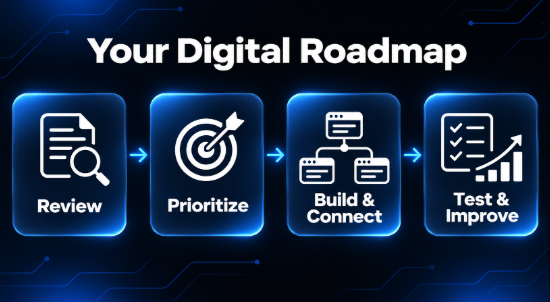
A roadmap should show what must happen before the next step can work.
For example, a customer dashboard needs trusted records. If each team uses a different customer name or account number, clean that up before linking the data.
Separate the work into small stages with useful outputs. One stage might create a shared customer record. The next could connect it to the booking tool. A later stage could add status updates.
For each stage, name an owner, the work involved, the expected result, and any tasks it depends on.
Leave room for feedback. What you learn during the first stage may change the later plan.
Keep the roadmap clear enough that the team can explain what happens next without reading a long report.
Step 6: Set a Budget for the Full Change
The monthly software fee is only one part of the cost.
Allow for setup, data cleanup, system connections, staff training, and support. Include the time employees spend testing and learning the new process.
Ask what happens if the number of users or records grows. Check usage limits and the features included in the quoted plan.
For a custom build, separate essential features from ideas that can wait. A smaller first release can show whether the core approach works before you fund more.
Compare costs over a useful period. A cheaper launch may come with higher ongoing work, while a more involved setup may reduce repeated admin.
Use clear assumptions when estimating benefits. Avoid treating every hour freed up as an immediate cash saving.
Step 7: Test With the People Who Do the Work
Give staff a safe place to try real tasks before a full launch.
Ask them to create a booking, correct a record, find an old file, and handle an incomplete request. Watch where they hesitate or need help.
Test unusual cases too. What happens when two people update the same record? What if a customer submits the form twice? Can work continue when a connection fails?
Make sure the team knows who to contact when something goes wrong.
Training should follow job roles. A manager may need reports and approvals, while a service worker needs today’s tasks and customer details.
Short guides for common tasks can be easier to use than one large manual.
A Simple Roadmap Example for a Service Business
Imagine a maintenance firm that tracks jobs through calls, email, and a shared sheet. Customers often call for updates, and office staff spend time checking with engineers.
This is an example, not a client case study.
The first stage could standardize the job record. Each job needs an owner, address, visit window, and clear status.
The next stage could connect the booking form to that record. Staff would check new requests before confirming the work.
Once the process is stable, the firm could add customer updates based on approved status changes.
Only after testing those steps would it assess whether a customer portal is worth building.
Each stage answers a clear question. Are records complete? Do bookings reach the right person? Do customers get useful updates? That evidence guides the next investment.
How to Measure Progress After Launch
Compare results with the starting point. Review a similar set of tasks so changes in workload do not distort the picture.
Useful measures include time to finish a task, records needing correction, customer follow-up calls, and work waiting without an owner.
Check whether people use the new process. If staff keep a second spreadsheet, ask what they cannot do in the new system.
Look at quality as well as speed. A faster process should still give customers accurate information and staff a clear next step.
Set a regular review and keep a short list of problems to fix. Give each item an owner and decide which changes matter most.
Progress means the business works better in practice, even when the result is less visible than a new app.
Mistakes That Can Weaken a Digital Project
Starting with a tool instead of a problem. Agree on the need before choosing software.
Changing too much at once. Staff still need time to run the business while learning new ways of working.
Moving poor data into a new system. Clean up records and decide which source to trust.
Ignoring daily users. A feature can look useful in a meeting but add work at the front desk.
Leaving support unclear. Know who handles access, faults, updates, and questions after launch.
Treating the roadmap as fixed. Review later stages when tests reveal new needs or limits.
Frequently Asked Questions
Is digital consulting only for large companies?
No. A small business can use a focused review to solve one connected problem. The scope should fit its needs, budget, and ability to manage change.
Do we need to replace all our software?
No. Reviewing the current setup may reveal useful features, better settings, or a simple connection between existing tools.
What should a technology roadmap include?
It should show the problem, planned changes, order of work, owners, budget assumptions, dependencies, and measures used to check results.
How long does a project take?
The timeline depends on the scope, data quality, system links, and staff availability. Agree on the work first, then set a realistic delivery plan.
Make Your Next Technology Decision Clearer
Start with one problem your team can describe and measure. Review how work happens today, compare the available options, and plan a small first step.
A useful roadmap gives each change a purpose and an owner. It helps you spend with more care, learn from real use, and build systems your team can rely on as the business grows.