You rely on timely, skilled service to keep operations moving and customers satisfied. Service scheduling organizes appointments, matches the right technician and parts, and routes work efficiently so you cut travel time, reduce missed appointments, and boost service quality.
This article shows how service scheduling works, what tools and practices make it effective, and how to implement solutions that fit your team and customers. Expect practical guidance on choosing software, setting rules for dispatching, and measuring performance so you can turn scheduling from a bottleneck into a competitive advantage.
Understanding Service Scheduling
Service scheduling assigns the right resource to the right task at the right time while balancing customer expectations, operational constraints, and cost. You will see how definitions, system components, scheduling types, and measurable benefits fit together to improve efficiency and service quality.
Definition of Service Scheduling
Service scheduling is the process you use to plan, allocate, and sequence appointments, jobs, or maintenance so work happens when and where it’s needed. It covers matching skills and equipment to tasks, setting start and end times, and enforcing lead times and service windows.
You schedule based on rules like technician certifications, geographic zones, priority levels, and SLA deadlines. The definition includes real-time adjustments for cancellations, no-shows, and emergency requests so your commitments remain achievable.
Key outcomes you aim for are minimized travel and wait times, maximal utilization of staff and assets, and adherence to contractual service levels. You also track compliance metrics such as on-time arrival rates and first-time-fix percentages.
Key Components of Scheduling Systems
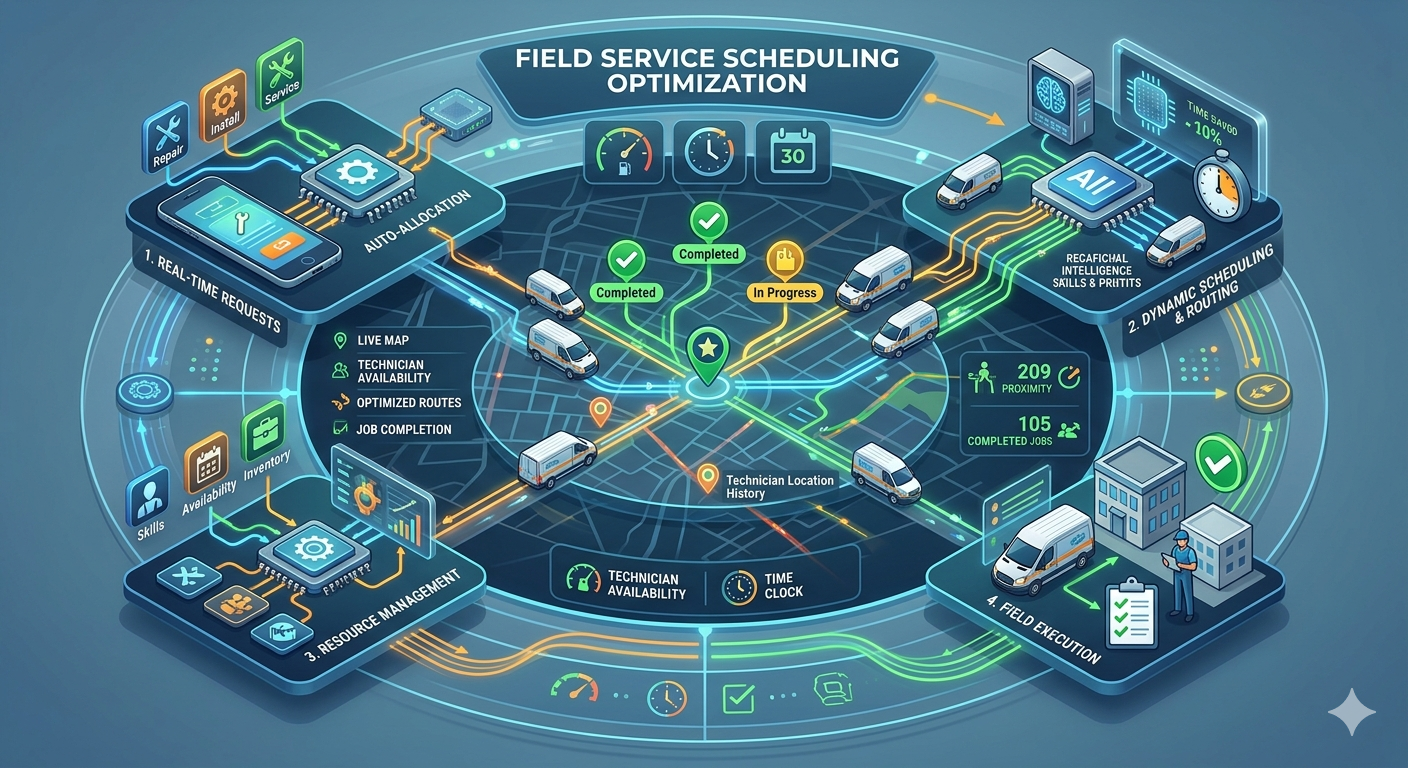
A scheduling system typically contains: a calendar/dispatch engine, resource and skills database, routing and travel-time calculator, and a customer-facing booking interface. Each component must integrate so data flows from booking to field completion.
You should ensure the resource database stores certifications, availability blocks, shift patterns, and productivity targets. Routing should calculate drive times, traffic windows, and multi-stop optimization to reduce travel cost and idle time.
Automation features like constraints-based matching, buffer time rules, and real-time re-optimization help you react to changes quickly. Reporting dashboards and alerts supply the operational insight you need to monitor KPIs and identify recurring bottlenecks.
Types of Service Scheduling
You will choose among several scheduling approaches depending on business needs: fixed appointments, window-based scheduling, recurring maintenance slots, and on-demand/dispatch models. Each serves different service profiles and customer expectations.
Fixed appointments set exact start times and work for predictable, high-touch services. Window-based scheduling offers arrival ranges (e.g., 9–12), trading precision for route efficiency. Recurring scheduling automates preventive maintenance using predefined intervals and triggers.
On-demand or emergency dispatch prioritizes speed and uses skill-based routing with dynamic reallocation. Hybrid systems combine methods—for example, recurring preventive tasks during low-demand blocks and fixed slots for high-value customers.
Benefits for Businesses and Customers
Service scheduling reduces operational waste and improves customer experience through predictable arrival times and faster resolution. You cut travel and overtime costs by optimizing routes and reducing idle periods.
For customers, accurate windows and self-service booking increase satisfaction and reduce missed appointments. For your business, better utilization boosts revenue per technician and improves first-time-fix rates, which lowers repeat visits and warranty costs.
You also gain measurable improvements: lower average travel time, higher on-time percentages, reduced cancellation rates, and clearer SLA compliance tracking. Those metrics enable continuous process improvement and more informed staffing decisions.
Implementing Effective Service Scheduling
You will focus on measurable ways to reduce wait times, use resources efficiently, and keep customers informed. The following guidance covers practical steps, tool selection criteria, and automation techniques you can apply immediately.
Best Practices for Scheduling Optimization
Start by mapping peak demand periods using at least 12 months of historical data to spot seasonality and daily patterns. Use that analysis to set staffing rules and buffer times that match service complexity and travel time.
Prioritize rules that improve reliability: minimum job durations, technician skill matching, and geographic clustering. Track these KPIs weekly: on-time arrival rate, average travel minutes per job, and first-time-fix rate. Adjust rules when KPIs slip more than 5–10%.
Implement a dynamic booking policy: reserve short slots for same-day fixes and block longer windows for complex jobs. Communicate trade-offs to customers (shorter wait vs. guaranteed tech). Review and tweak every quarter.
Selecting a Scheduling Solution
Choose software that supports real-time technician locations, two-way calendar syncing, and skill-based dispatching. Confirm it integrates with your CRM, billing, and parts inventory through APIs or prebuilt connectors.
Evaluate vendor reliability by uptime guarantees, update cadence, and support SLAs. Test the UI with frontline schedulers and technicians for at least two weeks; measure task completion time and error rates. Ask for sample reports: utilization, idle time, and missed appointments.
Price out total cost: subscription, implementation, training, and integration. Favor solutions with configurable rules engines and the ability to export data for custom analytics.
Automating Appointment Management
Automate confirmations, reminders, and ETA updates via SMS and email to cut no-shows by a measurable percentage. Send a confirmation immediately, a reminder 24–48 hours before, and an ETA 30–60 minutes prior based on real-time location.
Use two-way messaging to let customers reschedule or provide access instructions without agent intervention. Apply automated rules for auto-rebooking when a technician is delayed beyond a threshold.
Combine automation with exception workflows: flag cancellations or access issues for human review. Monitor automation performance with these metrics: message delivery rate, self-service reschedule rate, and reduction in manual scheduling tasks.